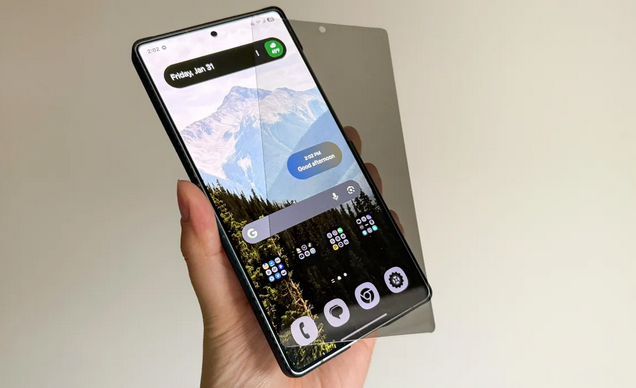
In a world where smartphones have become digital vaults of our lives, protecting privacy feels more important than ever. From banking apps and personal photos to confidential work emails and private conversations, everything lives on our screens. So when I upgraded to the Samsung Galaxy S25 Ultra, one of the most advanced and expensive smartphones available, I wanted to protect not just the device—but my privacy too.
That’s where the idea of a privacy screen protector came in.
On paper, it sounded perfect. A screen protector that blocks side-angle viewing so only I can see what’s on my phone? Ideal for public transport, cafes, offices, and crowded places. I imagined confidently scrolling through my phone without worrying about prying eyes.
But after installing one on my Galaxy S25 Ultra, my excitement quickly turned into frustration.
This is the full story of why I thought a privacy screen protector was a great idea—until I actually used one.
What Is a Privacy Screen Protector, Really?
Before diving into the experience, it’s important to understand what a privacy screen protector actually does.
A privacy screen protector uses micro-louver technology—tiny vertical blinds embedded in the glass or film. These louvers allow light to pass through only when viewed directly from the front. Anyone looking from the side sees a darkened or black screen.
The Promise of Privacy Screen Protectors
Privacy screen protectors typically claim to offer:
-
Protection against shoulder surfing
-
Added scratch and drop resistance
-
Reduced glare
-
Fingerprint and smudge resistance
-
Extra security in public places
For professionals, travelers, and anyone who values discretion, these features sound extremely appealing.
So naturally, I assumed pairing one with Samsung’s best flagship phone would be a flawless experience.
I was wrong.
Why I Chose a Privacy Screen Protector for the Galaxy S25 Ultra
The Galaxy S25 Ultra is not just any smartphone. It’s a premium device with:
-
A massive, high-resolution AMOLED display
-
Extremely high brightness levels
-
Advanced fingerprint security
-
A sleek, edge-to-edge design
Given how much I rely on my phone in public spaces, I thought adding a privacy layer would be a smart move.
My Expectations Going In
Before installation, I expected:
-
Minimal impact on display quality
-
Smooth touch responsiveness
-
Perfect compatibility with ultrasonic fingerprint scanning
-
Strong privacy protection without compromises
Unfortunately, reality had other plans.
First Impressions: Installation Was Easy, Confidence Was High
To be fair, the installation process itself was straightforward. The privacy screen protector aligned well with the Galaxy S25 Ultra’s display, and within minutes, it was securely attached.
At first glance, it looked great.
The screen felt solid, the protector fit perfectly, and the phone still looked premium. I felt satisfied—convinced I had made a smart upgrade.
That confidence lasted about ten minutes.
Problem #1: The Stunning Display Lost Its Magic
One of the Galaxy S25 Ultra’s biggest strengths is its display quality. Samsung’s AMOLED panels are known for their brightness, sharpness, color accuracy, and deep blacks.
The privacy screen protector changed that almost immediately.
Noticeable Drop in Brightness
Even at maximum brightness, the screen felt:
-
Dimmer than usual
-
Less vibrant
-
Slightly washed out
Indoors, it was manageable. Outdoors, especially under sunlight, it became a real problem. I found myself constantly increasing brightness just to see clearly.
Colors Looked Muted
The vivid colors that make Samsung displays stand out were noticeably dulled. Whites looked slightly gray, and colors lost their punch.
For a phone known for visual excellence, this felt like a downgrade.
Problem #2: Viewing Angles Were Too Aggressive
Privacy screen protectors are designed to limit side viewing—but on the Galaxy S25 Ultra, the effect felt too extreme.
Narrow “Sweet Spot”
The screen was only clearly visible when viewed perfectly straight on. Even a slight tilt caused:
-
Darkening of the display
-
Reduced contrast
-
Loss of readability
This meant:
-
Watching videos felt awkward
-
Reading long articles became uncomfortable
-
Showing something to a friend required physically angling the phone
Ironically, the phone felt less usable even for me—the actual owner.
Problem #3: Fingerprint Scanner Issues
Samsung’s Galaxy S25 Ultra uses an ultrasonic under-display fingerprint scanner, which is fast and reliable—without a screen protector.
With the privacy screen protector installed, that reliability disappeared.
Fingerprint Recognition Became Inconsistent
I noticed:
-
Failed fingerprint attempts
-
Slower unlock times
-
Frequent fallback to PIN or password
Even after re-registering my fingerprints multiple times, the problem persisted.
For a device that emphasizes seamless security, this was incredibly frustrating.
Problem #4: Touch Sensitivity Took a Hit
Another unexpected issue was touch responsiveness.
While basic taps worked fine, I noticed:
-
Missed gestures
-
Less accurate scrolling
-
Reduced responsiveness near screen edges
The Galaxy S25 Ultra’s smooth UI experience felt compromised. Simple actions required more effort, which added friction to daily use.
Problem #5: Increased Eye Strain Over Time
This was something I didn’t anticipate at all.
Because the privacy screen darkened the display, I found myself:
-
Increasing brightness more often
-
Staring harder to read text
-
Experiencing eye fatigue during extended use
Ironically, the feature meant to protect privacy ended up making my phone less comfortable to use for long periods.
Battery Life Took a Subtle Hit
Constantly boosting brightness had another side effect: battery drain.
While not dramatic, I noticed:
-
Slightly reduced screen-on time
-
Faster battery consumption outdoors
-
More frequent charging
On a phone known for all-day battery life, even a small reduction felt noticeable.
The Psychological Irony: Privacy at the Cost of Enjoyment
The biggest issue wasn’t technical—it was emotional.
I realized I was no longer enjoying my phone.
The Galaxy S25 Ultra is meant to be admired, used, and experienced. With the privacy screen protector on, it felt like I was intentionally limiting what I paid for.
Yes, my screen was private—but at what cost?
When Privacy Screen Protectors Actually Make Sense
To be fair, privacy screen protectors are not inherently bad. They work well for certain users.
They make sense if you:
-
Frequently handle sensitive business data
-
Work in crowded public environments
-
Use your phone primarily for messaging and emails
-
Don’t care much about display quality
For casual browsing and privacy-first usage, they can be effective.
But for a phone like the Galaxy S25 Ultra, the compromises feel too big.
Better Alternatives to Privacy Screen Protectors
After removing the privacy screen protector, I explored better options.
1. Use Built-In Privacy Features
Samsung already offers excellent privacy tools, such as:
-
Secure Folder
-
App lock features
-
Screen pinning
-
Biometric security
These features protect your data without ruining the display.
2. High-Quality Clear Tempered Glass
A premium clear tempered glass protector:
-
Preserves display quality
-
Maintains fingerprint performance
-
Offers scratch and drop protection
This felt like a better balance between protection and usability.
3. Adjust Screen Timeout and Lock Settings
Simple habits—like shorter screen timeouts and locking your phone quickly—can greatly reduce privacy risks.
Removing the Privacy Screen Protector: Instant Relief
The moment I removed the privacy screen protector, it felt like I got a new phone again.
-
Brightness returned
-
Colors popped
-
Fingerprint scanner worked flawlessly
-
Touch felt smooth and responsive
It was a reminder of why the Galaxy S25 Ultra is considered a top-tier smartphone.
Final Verdict: A Good Idea That Didn’t Match the Device
I genuinely believed a privacy screen protector was a smart upgrade. In theory, it made sense. In practice, it clashed with everything that makes the Galaxy S25 Ultra special.
What I Gained
-
Better privacy in public
What I Lost
-
Display quality
-
Touch responsiveness
-
Fingerprint reliability
-
Overall enjoyment
For a mid-range phone, the trade-off might be acceptable. For a premium flagship like the Galaxy S25 Ultra, it simply isn’t.
Conclusion: Privacy Shouldn’t Ruin the Experience
Privacy matters—but so does usability.
After living with a privacy screen protector on my Galaxy S25 Ultra, I learned that not every accessory suits every device. Some upgrades sound great until real-world use exposes their downsides.
If you value the Galaxy S25 Ultra for its incredible display, smooth performance, and premium feel, a privacy screen protector may end up feeling like a downgrade rather than an upgrade.